
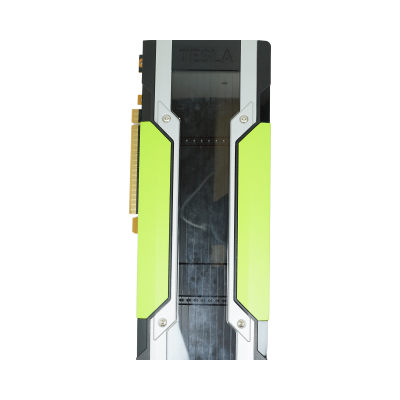
A graphics card is one of the few components where the second-hand market genuinely rewards you. Silicon does not wear the way a spinning disk does, and a previous-generation GPU with plenty of VRAM will often outperform a brand-new budget card at half the outlay. The trick is matching the card to the job — and to the case, slot and power supply it has to live in.
At a glance
- Interface
- PCI Express x16, backwards compatible with earlier PCIe generations at reduced bandwidth. Older cards in the range may be PCIe 3.0 or 2.0.
- Form factor
- Single, dual and triple-slot designs; full-height and low-profile variants. Check card length against your chassis before ordering.
- Memory
- GDDR5, GDDR6 or HBM2 depending on generation and class. VRAM capacity is the hard ceiling on texture resolution, scene size and model size.
- Cooling
- Active blower or axial fans for desktops and workstations; passive heatsinks on datacentre cards, which rely on chassis fans and will overheat in a standard tower.
- Power
- Slot power only on lower-tier cards, rising to one or more 6-pin, 8-pin or 12VHPWR connectors. Confirm your PSU has the rails and headroom.
- Display outputs
- DisplayPort, HDMI and DVI combinations vary by model. Compute and accelerator cards are frequently headless with no outputs at all.
- Software
- NVIDIA Game Ready and Studio drivers for consumer boards, enterprise drivers for professional and datacentre parts. CUDA, NVENC/NVDEC and OptiX support depend on the generation.
Typical deployments
Gaming builds on a budget
Prioritise VRAM and memory bandwidth over headline clock speed. Modern titles at 1440p will run out of framebuffer long before they run out of shader throughput, so a previous-generation card with more memory usually beats a newer, narrower one. Match the card to your monitor, not to a benchmark chart.
CAD and 3D modelling
Professional Quadro and RTX workstation boards are the sensible choice here, not because they are faster but because the certified enterprise drivers are what SolidWorks, CATIA and Revit are validated against. Viewport stability and double-precision behaviour matter more than frame rates.
Rendering and simulation
CUDA core count and VRAM both scale results directly — a scene that does not fit in memory falls back to host RAM and collapses in performance. Two mid-tier cards often render faster than one flagship, provided the motherboard has the lanes and the case has the airflow.
Video editing and encode farms
Look for NVENC generation rather than raw GPU power. Timeline scrubbing, proxy generation and H.264/HEVC export lean on the fixed-function encoder block, so a modest card with a current encoder can outpace an older high-end board on export times.
AI and machine learning
Memory capacity dictates what you can train or serve; tensor core support dictates how quickly. For inference and experimentation, used accelerators with generous VRAM are far better value than a new consumer card with 8GB. Check framework support for the compute capability you are buying.
VDI and shared desktops
Virtual desktop hosts need passively cooled, server-form-factor cards and the appropriate NVIDIA licensing for GPU partitioning. Size around concurrent users and framebuffer per session rather than peak single-user performance.
Why buy from Compuwyze
- Every card is tested under load and graded before listing, not sold sight-unseen
- Covered by our 12-month return-to-base warranty
- Specifications on each listing state slot width, memory size, outputs and power connectors so you can check fitment first
- Enterprise pulls alongside consumer boards — including passive datacentre cards that rarely surface in the retail channel
- Technical staff who can tell you whether a card suits your chassis, PSU and workload before you commit
- Reusing serviceable silicon keeps working hardware out of the waste stream and the cost per frame sensible
Frequently asked questions
What does refurbished mean for a graphics card?
It means the card has been recovered from a decommissioned system, cleaned, inspected for physical damage, reseated with fresh thermal interface material where required, and tested under sustained load to confirm the GPU, memory and fans all behave. Cosmetic marks on the shroud or bracket are normal on used hardware; anything beyond light wear is reflected in the grading.
Is a used GPU safe for gaming or production work?
Yes, with the usual caveat that the component must be tested rather than assumed. GPUs have no moving parts other than the fans, and fans are serviceable. A card that passes an extended load test without thermal throttling, artefacts or memory errors is as dependable as a new one at the same clocks.
Will the card fit my case and power supply?
Check three things on the listing: physical length, slot width and the power connectors required. A triple-slot card will block adjacent PCIe slots, and a card needing two 8-pin feeds will not run from a PSU with one. If the listing does not answer your question, ask us before ordering.
Can I put a datacentre card in a desktop PC?
Not without planning for it. Passively cooled accelerators have no fans of their own and depend on the high static pressure airflow of a rack chassis. Dropped into a tower they will throttle hard or shut down. Many are also headless, so you will need a separate display adapter.
What is included with the card?
Contents vary by item, so the listing is authoritative. Used GPUs are generally supplied as the card itself with the fitted bracket; adapters, power cables, retail boxes and licence entitlements are not assumed to be present unless stated.
Which drivers should I install?
Consumer GeForce cards use the Game Ready or Studio branch. Quadro and RTX professional boards should run the enterprise driver for application certification, and datacentre parts use the datacentre driver package. Older generations eventually move to legacy driver branches, so confirm support for your operating system if you are buying a much older part.