



Dell's PowerEdge line has the deepest second-hand supply of any server platform, which makes it the most cost-effective way to add capacity — provided you pick the right generation. A 13G R630 is still perfectly capable of running a file server or a lab; a 15G R750 with 32 DIMM slots is a different proposition for a virtualisation host you expect to keep for five years. The notes below are intended to help you decide which side of that line your workload sits on.
At a glance
Typical deployments
Virtualisation hosts
Memory capacity decides how many VMs you fit, not clock speed. A dual-socket R740 or R750 gives you 24 or 32 DIMM slots, so populating with mid-density modules is cheaper per gigabyte than chasing 128GB sticks. Aim for matched CPUs across a cluster and identical firmware levels before you worry about core count.
SQL Server and licensed databases
Per-core licensing inverts the usual logic: fewer, faster cores cost less to run legally. A 1U R650 or R640 with high-frequency Xeons and NVMe in the front bays will beat a 32-core part that you then have to license. Keep the memory channels balanced and give the log volume its own device.
Backup, archive and file storage
Here the chassis matters more than the processors. The R740xd and the LFF R540 exist to hold spindles, so prioritise bay count, backplane type and a controller in HBA mode if you are running ZFS or a software-defined target. Modest CPUs are fine and reduce idle draw.
Edge and remote sites
The XR11 is a short-depth 1U built for cabinets and enclosures that will not take a full-length server, with front-facing I/O. Where rack depth is not the constraint but noise is, a T440 tower sits happily in a comms room and still takes two sockets and 16 DIMMs.
CAD, simulation and content creation
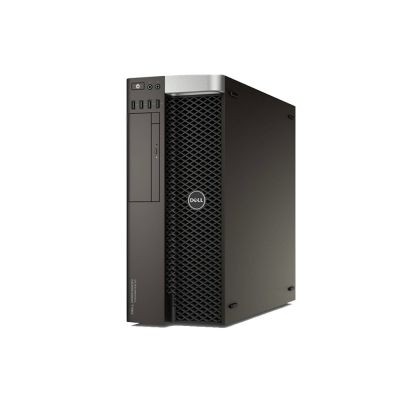
Precision workstations trade rack density for GPU room, quieter cooling and ECC memory. Choose by the software: single-threaded modellers such as SolidWorks or Revit reward frequency, while rendering and simulation scale with cores and with the professional GPU you can physically fit and power.
Labs, training and dev/test
This is where older generations earn their keep. An R630 or R730 gives you real iDRAC, real redundant PSUs and enough RAM to nest hypervisors for a fraction of current pricing — ideal for certification work, staging environments and proving a design before you commit budget.
Why buy from Compuwyze
- Every server and workstation is inspected, tested under load and updated before it is listed for sale.
- UK-based warranty on Dell hardware, with support from people who work on these platforms daily.
- Depth across generations — 13G through 15G PowerEdge alongside Precision workstations and Dell networking — so you can standardise rather than mix vendors.
- Configure to order: processors, memory, drives, caddies, controllers and network daughter cards specified to your requirement.
- Matching spares and upgrade parts held for the same platforms, which keeps a fleet serviceable years after end of sale.
- Multi-unit and project enquiries welcome, including consistent builds across a cluster or rack refresh.
Frequently asked questions
What does refurbished mean on this page?
Enterprise hardware that has come out of service, been stripped and cleaned, functionally tested and brought up to a known firmware state before listing. Cosmetic marks consistent with rack use are normal; anything that affects function is repaired or the part is replaced. Data-bearing drives are wiped or replaced.
Can I run a refurbished Dell PowerEdge in production?
Yes — PowerEdge servers are designed for continuous duty and most units on the market have spent their lives in air-conditioned racks. The sensible approach is the same as with new kit: redundant power supplies, a supported drive layout, iDRAC configured for alerting, and a spare of anything you cannot afford to wait for.
What is included with each server?
Each listing states the exact configuration — processors, memory, drives, controller and power supplies — along with any rails or caddies supplied. If you need something that is not listed, such as additional caddies, a specific PERC or a rail kit for your cabinet depth, ask before ordering and we will quote it.
How far can these servers be upgraded?
CPU and memory upgrades are straightforward within a generation, provided you stay on the processor family the board supports and respect the DIMM population rules. The harder limits are physical: drive backplane type, riser layout for PCIe cards and GPU power headroom are set at build, so choose the chassis with the end state in mind.
Which generation should I choose — R630, R740 or R750?
Work back from lifespan and workload. A 13G R630 or R730 is the value option for labs, file services and secondary roles. 14G R740/R740xd hits the balance of price, DDR4 capacity and NVMe support for general virtualisation. 15G R650/R750 makes sense when you want more memory slots, PCIe Gen4 and the longest runway before the platform ages out.
Can you build the configuration I specify?
In most cases, yes. Send us the core count, memory total, drive layout and network requirement — or the workload you are sizing for — and we will propose a build from the platforms we hold. For clusters we will match components across nodes so hosts behave identically.