
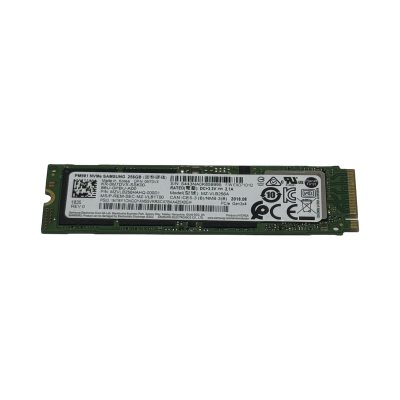
NVMe drives connect over PCIe lanes rather than through a SAS or SATA controller, which strips out a layer of protocol overhead and is why they now sit behind most hypervisor datastores, database logs and storage cache tiers. This range covers refurbished enterprise NVMe SSDs in U.2 and M.2 formats, many carrying Dell, HPE or Cisco part numbers alongside the manufacturer's own model code. With NVMe, the bay or slot you have decides more than the spec sheet does, so the notes below start there and work towards the workload.
At a glance
Typical deployments
Boot and hypervisor drives
An ESXi, Proxmox or Linux install needs little capacity and barely touches write endurance, so small M.2 drives do this job well. A mirrored pair of 256GB drives such as the Micron 2200S or Micron 2300 keeps the operating system off your data drives and leaves every front bay free for capacity. Confirm the length your boot adapter accepts and that it supports NVMe rather than SATA only. There are more boot-sized options in our refurbished M.2 SSD range.
Write caching, SLOG and transaction logs
Endurance is the figure that matters here, not capacity. A ZFS SLOG, a vSAN cache tier or a database log volume takes a constant stream of small synchronous writes, which wears read-optimised flash quickly. Choose a Write Intensive drive such as the Intel DC P3700 800GB or an Optane drive like the Intel Optane DC P4800X 375GB. Modest capacities are normally plenty for this role.
Virtualisation datastores
Shared VM storage sees random reads and writes from many guests at once, so Mixed Use is the sensible default. A high-capacity U.2 drive like the Kioxia CD5 3.84TB holds a useful number of VMs per drive. Buy matched drives in the quantity your mirror, RAID or vSAN disk group needs, and keep one spare so a failed drive can be swapped without waiting on an order.
Read-heavy services
Content serving, VDI golden images, analytics scans and search indexes read far more than they write. Read Intensive drives trade endurance for capacity, which suits that pattern. The Seagate Nytro XM1440 960GB and the Samsung PM963 960GB are both 22110 M.2 drives, so check your slot or carrier card has a mounting point for the 110mm length.
Database servers
SQL Server, PostgreSQL and MySQL data files take mixed random I/O, so Mixed Use drives are the usual choice. Size for the working set plus growth, give the buffer pool enough memory that it is not leaning on storage for every query, and split transaction logs onto a separate Write Intensive or Optane drive where budget allows. That split does more for commit latency than a bigger data drive.
Workstation scratch and project drives
Video editing caches, large CAD assemblies and local machine learning datasets all benefit from a fast scratch disk sitting directly on PCIe. The SK Hynix PC801 2TB is a Gen4 x4 M.2 2280 drive with enough room for active projects, and it reaches its full speed in a Gen4 slot. Keep finished work on bulk storage and let the NVMe drive handle what you are working on today.
Compatibility checks before you order
Most problems with NVMe upgrades come from the host, not the drive. Run through these before buying.
Why buy from Compuwyze
- Every drive carries our 12-month return to base warranty
- Free UK delivery on orders over £50, and we aim to ship orders for simple items placed before 2pm the same day
- UK delivery is normally next working day once shipped; international orders usually arrive in 2 to 5 days via FedEx economy or priority
- Returns accepted within 30 days, with return shipping paid by the customer
- OEM and manufacturer part numbers shown in product titles, so matching a drive to your existing hardware is straightforward
- If you would rather have drives fitted, configured servers carry a 3-year return to base warranty and we aim to ship them within 2 business days
Frequently asked questions
Is it sensible to buy a refurbished NVMe SSD?
For enterprise drives, usually yes. Unlike most components, an SSD's wear is measurable: the drive reports how much of its rated endurance it has used, so you can judge remaining life rather than guess at it. Enterprise NVMe models are also designed for continuous duty in servers. The key is matching endurance class and health to the job. Our article on refurbished versus new hardware covers the wider reliability question.
What is the average lifespan of an NVMe SSD?
Flash wears with writes, not with age, so lifespan depends on the workload. Manufacturers rate endurance in terabytes written (TBW) or drive writes per day (DWPD), and a Write Intensive drive is rated for far more writes than a Read Intensive one. Once installed, smartctl or nvme-cli reports a 'Percentage Used' value; below 100 means the drive is still within its rated endurance. A boot drive can run for many years, while a busy SLOG will wear a small read-optimised drive much faster.
Is NVMe better than a SATA or SAS SSD?
NVMe is a protocol designed for flash and runs over PCIe, while SATA and SAS were built around spinning disks. In practice that means lower latency and much higher throughput per drive. It is not automatically the right choice: SATA and SAS SSDs work behind conventional hardware RAID controllers and suit any standard 2.5in bay, which keeps many upgrades simpler. If your server has no NVMe bays or spare slots, browse our wider refurbished SSD range.
Will a Dell, HPE or Cisco coded NVMe drive work in my server?
Start by matching the part number against your server's supported parts list. OEM-coded drives are the natural fit for that vendor's hardware. Elsewhere they usually work as standard NVMe drives, but we cannot promise how every third-party system or controller will treat them, so check before ordering several.
What do Read Intensive, Mixed Use and Write Intensive mean?
They are endurance classes. Read Intensive drives suit workloads that mostly read, such as content serving and boot volumes. Mixed Use drives cover general server duty, including VM datastores and database files. Write Intensive drives, along with Optane, are for caches and logs that take sustained writes. The class is shown in each product title.
Can I search for a drive by part number?
Yes. Most product titles show the OEM part number in brackets, such as 3DM57, XPWV2 or 869254-002, alongside the manufacturer and model. If you are working from an Intel SSDPE-prefixed code, an HPE MO-prefixed code or a Micron MTFD number, search for both that code and the model name, because the same drive is often sold under several codes.