

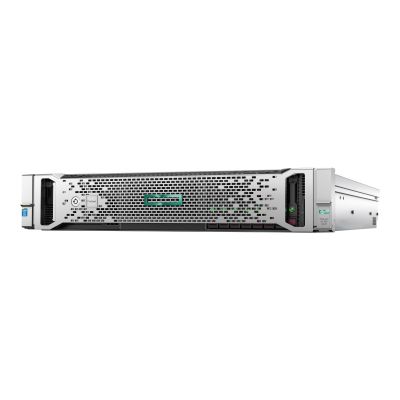
Few servers have been deployed as widely as the ProLiant DL380. Two sockets, a deep DIMM count and a chassis that can be ordered for small-form-factor or large-form-factor drives make it the default choice for virtualisation hosts, application servers and general-purpose consolidation. On the secondary market that ubiquity works in your favour: parts, caddies, rails and spare risers are plentiful, and firmware and driver support is mature rather than experimental.
DL380 at a glance
Typical deployments
Virtualisation hosts
RAM runs out long before cores do. Prioritise populated DIMM slots over headline clock speed, and keep modules balanced across both CPUs so every memory channel is in use. A pair of mid-bin 12 or 16 core parts with 256GB or more will consolidate more guests than two high-frequency chips with half the memory.
SQL Server and other per-core licensing
Here the arithmetic reverses. Fewer, faster cores cost less to license and finish queries sooner, so a lower core count with a high base frequency and a large L3 cache is usually the better buy. Pair it with SSDs on a cached Smart Array controller and put logs and data on separate volumes.
Backup, file and archive
Choose an LFF chassis and spend the budget on spindles rather than silicon. Two entry-level CPUs and modest memory are ample for a backup target or repository; what matters is bay count, controller cache and, if you are running deduplication, enough RAM to hold the index.
VDI and container hosts
Session density scales with memory bandwidth and thread count, so fully populate the channels and favour SFF flash for the boot and image storage. If you are adding a GPU for graphics-accelerated desktops, confirm the riser and higher-output power supplies are part of the configuration you order.
Software-defined storage
vSAN, Ceph and Storage Spaces Direct expect direct disk access, so the controller needs to present drives rather than hide them behind a RAID set. Ask for HBA mode or a pass-through controller, and plan cache and capacity tiers before choosing between SFF and LFF.
Labs, test and dev
A Gen9 DL380 is one of the cheapest routes to a genuine dual-socket lab with out-of-band management and redundant power. Buy the memory you need on day one, since it is the upgrade most likely to be the bottleneck, and keep a spare drive caddy to hand.
Why buy from Compuwyze
- Every DL380 is tested in the UK before it ships, with firmware checked and the configuration verified against the listing
- 12-month warranty on refurbished servers, backed by UK support you can speak to
- Gen9 and Gen10 stocked side by side, so you can weigh price against platform life rather than take whatever is available
- Processors, memory and drives specified to your workload instead of a fixed shelf configuration
- Next-day delivery available on stocked configurations
- Access to matching spares and components, which keeps a fleet consistent as it grows
Frequently asked questions
What does refurbished mean for these servers?
Each chassis is stripped, cleaned and rebuilt to the configuration listed, then powered up and tested. We check the board, memory, drives, power supplies and fans, confirm iLO is accessible and clear previous configuration data before the server is packed. Cosmetic marks consistent with rack use are normal; anything that affects function is replaced.
Should I buy Gen9 or Gen10?
Gen9 gives you the lowest cost per core and per gigabyte, and remains perfectly capable for file, backup, application and lab duties. Gen10 moves to Xeon Scalable and iLO 5, with better per-core performance and a longer runway on current operating systems and hypervisor support lists. If the server is going into production for several years, check your hypervisor's compatibility list for the generation you are considering.
Is a refurbished DL380 suitable for production?
Yes — it is what the platform was designed for, and the redundant power supplies, hot-plug fans, hot-plug drives and iLO management are all intact. Treat it as you would any server: keep it monitored, hold a spare drive or power supply for anything business-critical, and size memory and storage for growth rather than today's peak.
What is included with the server?
Servers ship with the processors, memory, drives, caddies and controller stated in the product listing, along with the installed power supplies. Rails, bezels, additional risers and higher-capacity drives are not assumed unless the listing says so — tell us what you need and we will quote the complete build.
Can the configuration be changed before it ships?
In most cases, yes. CPUs, memory capacity, drive type and controller can usually be adjusted, and it is cheaper to have us build it correctly than to open the chassis later. Get in touch with the workload you are running and we will suggest a sensible balance of cores, memory and storage.
How much memory can a DL380 actually take?
The platform provides 24 DIMM slots and supports up to 3TB with the largest load-reduced modules, though the practical maximum depends on the processors fitted and the module type. For best performance, populate both CPUs symmetrically and fill all memory channels rather than stacking large modules on a few slots.