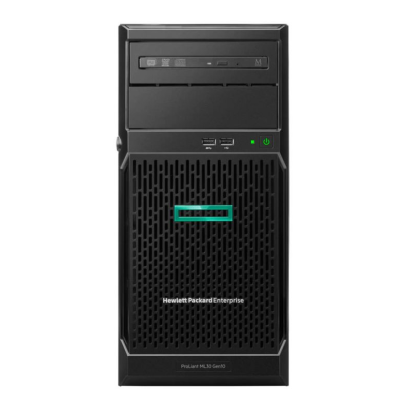
The ML30 sits at the bottom of the ProLiant ML tower family, and that is its strength. It is a compact, single-socket machine that brings server-grade features into an ordinary office: ECC memory, HPE iLO out-of-band management and the same firmware and driver ecosystem as the rest of ProLiant Gen10. A refurbished ML30 Gen10 server suits a business that has outgrown a NAS or a desktop doing server duty, but has no use for a dual-socket rack chassis. The notes below will help you decide whether the ML30 is the right fit, and what to prioritise when you configure one.
At a glance
Typical deployments
File, print and directory services
This is the job the ML30 is built for. Drive capacity and redundancy matter far more than CPU here. Mirror the boot volume, put shared data on its own RAID set, and favour LFF bays if you need terabytes rather than IOPS. A domain controller needs very little processor, but it does need to stay up, so spend the budget on drives and a spare rather than a faster chip.
Accounts and line-of-business databases
Small SQL instances, accounts packages and CRM systems tend to favour fewer, faster cores, and per-core licensing makes a high core count expensive anyway. Give the database enough memory to cache its working set, and put data and logs on SSD. If the application vendor publishes minimum specifications, size to those before adding headroom.
Backup target
An ML30 makes a sensible on-site repository for backup software. Prioritise raw capacity in LFF bays and a hardware controller so you can run parity RAID with cache protection. Network throughput is often the real bottleneck, so check what your backup window needs. Keep it physically separate from the servers it protects where you can.
Light virtualisation
A handful of small virtual machines will run comfortably, but memory runs out long before CPU does. Fill memory first, use a hardware RAID controller, and check your hypervisor version against HPE's support information. If you are planning more than a few VMs, a dual-socket platform such as the 2U ProLiant DL380 Gen10 gives you far more memory and drive headroom.
Branch and remote offices
Where nobody on site looks after IT, iLO earns its place. Cable the dedicated management port and set it up before the server ships out, so you can power-cycle and check hardware health remotely. Redundant power is not a given on an entry tower, so check the build and consider a UPS as standard.
Test, development and lab use
A refurbished ML30 is an affordable way to stand up a test copy of a production service or an IT training lab. Match the operating system and firmware to production as closely as you can, so that what passes in the lab behaves the same way when it goes live.
ML30, ML110 or ML350 Gen10
All three are Gen10 ProLiant towers, and they share iLO management and the HPE firmware tooling. The difference is how far each one scales.
ProLiant ML30 Gen10
Entry single-socket tower. It is the right choice when one server runs a small office and the workload is predictable: file shares, directory, backup, a modest database. It offers the lowest cost of entry, with the least expansion.
ProLiant ML110 Gen10
Still single-socket, but built around Xeon Scalable processors with more memory capacity and expansion than the ML30. A refurbished ML110 Gen10 suits a growing business that wants room for more RAM, more PCIe cards or a heavier application without moving to two processors.
ProLiant ML350 Gen10
The top of the Gen10 tower range, with dual-processor support, much larger drive and memory capacity and redundant power options. A refurbished ML350 Gen10 is effectively a rack-class server in a tower, suited to virtualisation hosts and multi-role servers.
If you have a rack, or expect to have one soon, a rack server is often the better long-term buy. The HPE ProLiant DL360 Gen10 packs dual-socket performance into 1U. For a newer platform, you can configure a DL360 Gen10 Plus to order.
Choosing a configuration
Start with storage, because that is what most ML30 deployments are really about. Work out usable capacity after RAID, then decide between LFF and SFF bays and whether you need a hardware controller. Memory comes next. Size it to the operating system and applications with sensible headroom, and remember that a single-socket board has a lower ceiling than a dual-socket one. The processor matters least for typical ML30 roles, unless you are running a licensed database, where a faster, lower-core-count part is usually the better buy. If you would rather spec CPU, memory, drives and controller in one place, our build-to-order server configurator walks through each choice.
Why buy from Compuwyze
- Configured servers come with a 3-year return-to-base warranty. Simple items and components carry 12 months.
- We aim to ship configured servers within 2 business days, and simple items ordered before 2pm the same day.
- UK delivery is normally next working day once your order has shipped.
- Free UK delivery on orders over £50, by courier or on a pallet for heavier and bulk orders.
- Returns are accepted within 30 days, with return shipping paid by the customer.
- International shipping via FedEx, with economy and priority services usually taking 2 to 5 days.
Frequently asked questions
What is the difference between the ML30 Gen10 and the ML30 Gen10 Plus?
Both are entry single-socket HPE towers, but the Gen10 Plus moved to a later Intel Xeon generation. They are different platforms, so processors and memory are not guaranteed to swap between them. For a refurbished purchase, the Gen10 is usually the lower-cost option. The Gen10 Plus gives you a newer processor generation and a longer runway for firmware and OS support.
Is an ML30 Gen10 powerful enough for my business?
For file and print, directory services, backup and a small accounts or CRM database, generally yes. The limits arrive with virtualisation at scale, large databases or anything that needs a lot of memory. If you are close to those limits, look at the ML110 Gen10 or ML350 Gen10 instead. Sizing from today's workload plus planned growth is more reliable than buying the fastest processor available.
Which operating systems will it run?
ProLiant Gen10 servers are widely used with Windows Server, mainstream Linux distributions and common hypervisors. Support for specific versions depends on HPE's published support matrices and on the storage controller fitted. Check your chosen OS version against HPE's support information before you deploy, particularly for hypervisors, which may not recognise embedded software RAID.
Can I upgrade the memory and drives later?
Yes, within the limits of the platform. Match the memory type and speed to what the board supports, and add modules in the configurations HPE recommends so every channel performs as it should. For drives, use carriers and capacities suited to the bay type you have. If you expect to grow storage, leave free bays at the outset rather than filling every slot with small disks.
Should I buy a tower or a rack server?
Choose a tower if the server will sit in an office or cupboard with no rack, and you need one machine rather than several. Choose a rack server if you already have a cabinet, need several servers in a small footprint, or want dual-socket performance. Rack servers are typically louder, so a tower is the kinder choice in a shared workspace.